Amol B
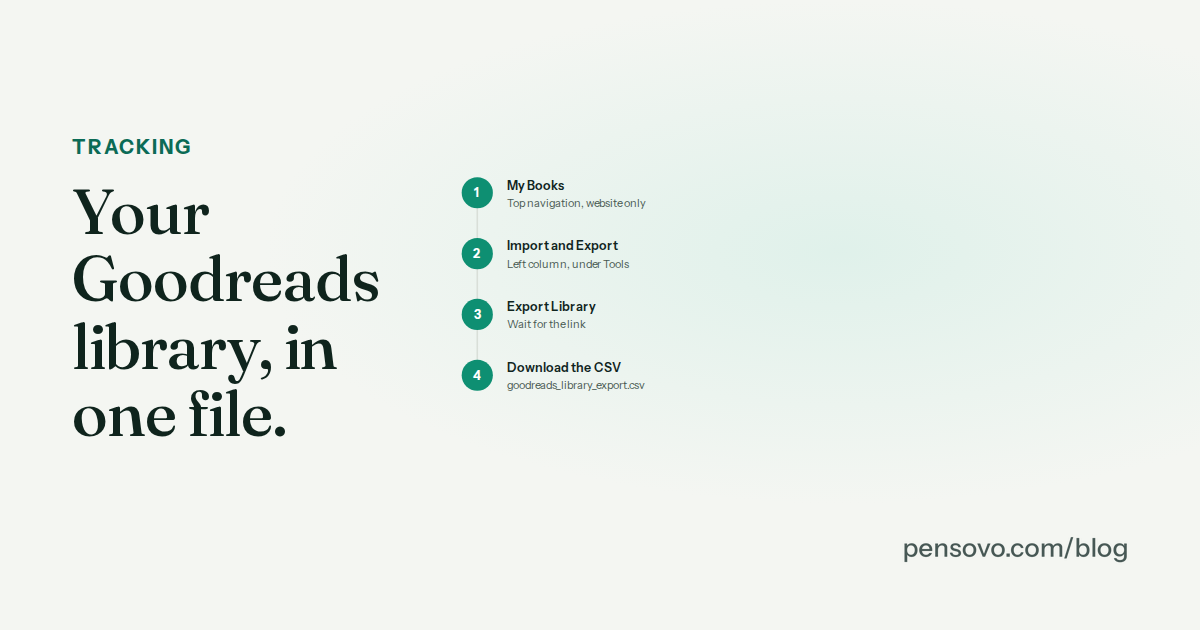
Where is the export button on Goodreads?
On the website, under My Books. It is not in the app, and it is not in Settings, which is where most people look first.
What does the Goodreads CSV contain?
| Column | Kept by most importers | Notes |
|---|---|---|
| Title, Author, Additional Authors | Yes | |
| ISBN, ISBN13 | Yes — the main matching key | Often blank for ebooks and old editions; wrapped in ='' quoting that importers strip |
| My Rating, Average Rating | Your rating, yes | Whole stars only |
| Publisher, Binding, Number of Pages, Year Published | Usually | The edition's page count, not necessarily your copy's |
| Date Read, Date Added | Yes | One Date Read per book; rereads collapse into Read Count |
| Bookshelves, Exclusive Shelf | Yes | read, currently-reading, to-read map to Finished / Reading / Want to read; custom shelves become tags or collections |
| My Review, Private Notes | Sometimes | Long text; check the importer |
| Read Count, Owned Copies | Rarely |
What gets lost when you export from Goodreads?
Three things, and the first surprises people.
Your day-by-day progress. Goodreads stores one Date Read per book. There is no record of which days you read, so no tracker can honestly carry over a reading streak from a Goodreads import — anything that claims to is inventing it. What can be rebuilt honestly is your Finished shelf with dates, your want-to-read list, and your "books read this year" count.
Your friends and their activity. Nothing about your network is in the file.
Kindle highlights. These live in your Amazon account, not in Goodreads. They have their own export, covered in a separate guide.
Why is my Goodreads export not working?
- The link never appears. Wait a minute and refresh the page rather than clicking Export Library again; repeated clicks queue repeated jobs.
- The file is empty or tiny. You exported from an account with a different library than you expected — check which account you are signed into.
- Dates look wrong. Goodreads writes dates as
YYYY/MM/DD. Spreadsheets sometimes reinterpret them; import the CSV into a tracker directly rather than via Excel. - Odd characters in titles. The file is UTF-8. If you open it in an old spreadsheet app, choose UTF-8 on import.
How do I import the file into another tracker?
Most trackers accept the Goodreads CSV directly. StoryGraph has a dedicated Goodreads import that maps shelves automatically and reads your ratings; Hardcover and Margins accept the same file; Bookmory's import is less reliable with dates. Whatever you import into, check three things before you delete anything: that books with no ISBN were matched or flagged rather than dropped, that Date Read landed as a finish date, and that the app can export your data back out in a standard format. A tracker that cannot export is a tracker you cannot leave.
Common questions
Can I export from the Goodreads app?
No. The export exists only on the website. Sign in at goodreads.com in any browser, including the one on your phone.
How long does a Goodreads export take?
Usually under a minute; a library of several thousand books can take a few. Refresh the page if the link has not appeared after two minutes rather than clicking Export again.
Will my reading streak transfer?
No tracker can honestly transfer a streak from Goodreads, because the export has one Date Read per book and no daily history. Finish dates, shelves and ratings do transfer.
Can I import my Goodreads library into StoryGraph?
Yes. StoryGraph's import accepts the Goodreads CSV directly and maps your read, currently-reading and to-read shelves. Custom shelves become tags.
Does the export include my reviews?
Yes — the My Review and Private Notes columns hold them as plain text. Not every importer reads those columns, so check before deleting the Goodreads copies.
How often should I export?
Every few months, and always before a big change to your shelves. Each export replaces the previous download link, so keep the files yourself.