Amol B

The six columns, and why only six
| Column | Type | Why it earns its place |
|---|---|---|
| Title | Text | Obvious. Write it fully the first time so search finds it. |
| Author | Text | Sorting by author is the first question you will ask. |
| Pages | Number | Makes the year countable in pages, and gives you pace. |
| Started | Date | With Finished, gives days-to-finish — the most interesting number a spreadsheet produces. |
| Finished | Date | Blank means in progress or abandoned; that is a feature. |
| Rating | Number, 0–5 in halves | Rate the moment you close the book, before the opinion softens. |
| One line (optional) | Text | What it was about or what you took from it. Ages better than the rating. |
Everything else people add — format, genre, source, price, mood, shelf, publisher — is a question you have not asked yet. Add the column the day you ask it. Templates with twenty-two columns are abandoned by February because filling twenty-two cells at bedtime is a chore, and a chore is what kills a log.
The three formulas
Assuming the template's column order (A title, B author, C pages, D started, E finished, F rating) and a header row, in Google Sheets or Excel:
- Books finished this year:
=COUNTIFS(E:E,">="&DATE(YEAR(TODAY()),1,1),E:E,"<="&TODAY()) - Pages read this year:
=SUMIFS(C:C,E:E,">="&DATE(YEAR(TODAY()),1,1),E:E,"<="&TODAY()) - Average days to finish: in a helper column G,
=IF(E2="","",E2-D2); then=AVERAGE(G:G).
Add a fourth if you like: average rating, =AVERAGE(F:F), mostly to discover that you rate everything four stars.
Download the template
book-tracker-template.csv — the seven columns with three example rows. Open it in Google Sheets (File → Import), Excel or Numbers, delete the examples, and change the date format to your locale if the dates look odd. It is a plain CSV so it will open anywhere, forever.
Why spreadsheets get abandoned
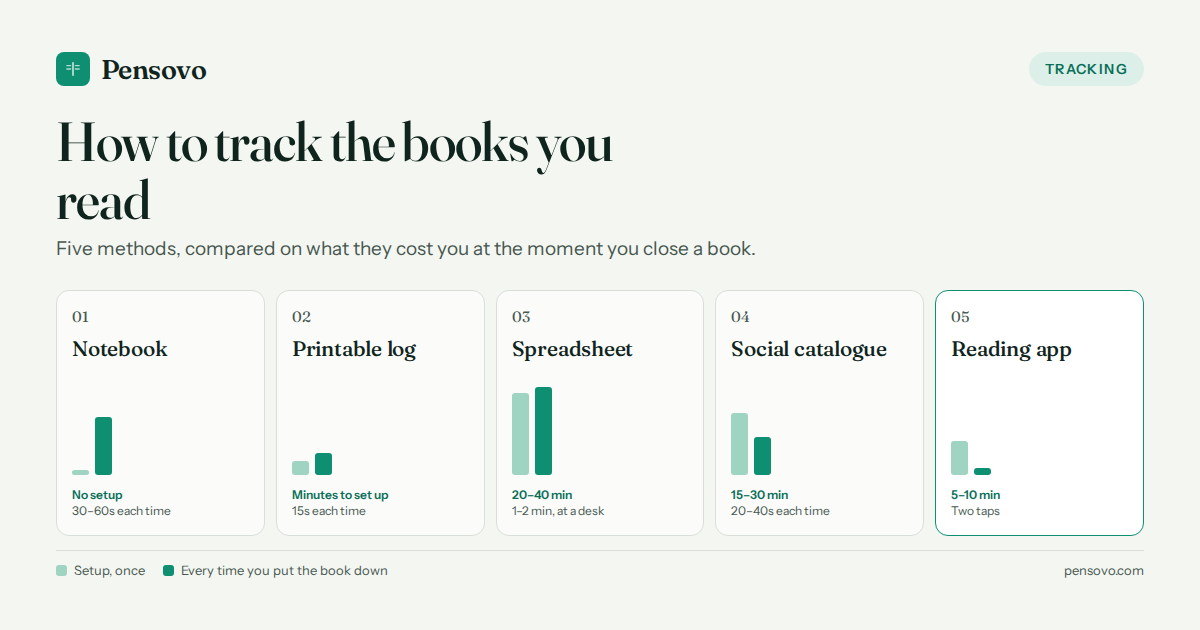
Not for lack of power — a spreadsheet will tell you your median days-to-finish by genre, which nothing else will. They get abandoned because the moment you put a book down is eleven at night, in bed, on a phone, and nobody opens a spreadsheet then. The entry gets deferred to tomorrow, then to the weekend, then never. It is a capture problem, not an analysis problem.
When should you stop using a spreadsheet?
Three signals, any one of which is enough: you have missed a week of entries and the blank rows feel like failure rather than information; you want to log sessions — pages tonight, minutes today — rather than books, because that is where the habit lives; or you want the log on your phone in two taps without a spreadsheet app. At that point the spreadsheet becomes the archive and an app becomes the log, and you can export from most apps back to a CSV so the archive stays complete.
Common questions
Is there a free book tracker template for Google Sheets?
Yes — download the CSV above and import it with File → Import. Seven columns, three example rows, and the formulas in this article.
What columns should a reading tracker spreadsheet have?
Title, author, pages, date started, date finished, rating, and optionally one line. Add anything else only when a specific question demands it.
How do I count books read this year in a spreadsheet?
COUNTIFS on the finished-date column between 1 January and today. The exact formula is in the article.
Should I track reading sessions in the spreadsheet?
No — one row per book. Sessions (pages tonight, minutes today) belong in an app with two-tap logging; a spreadsheet at bedtime does not get filled in.
Excel or Google Sheets for a book tracker?
Either; the template is a plain CSV. Sheets is easier to reach from a phone, which is where most logging happens.
When should I switch from a spreadsheet to an app?
When you miss a week of entries, when you want to log sessions rather than books, or when you want two-tap logging on your phone. Keep the spreadsheet as the archive.